Connection pools have a hard maximum size, when all connections are checked out, new requests wait and timeout even if the database is fine
Most exhaustion is not from too much load, but from holding connections open during slow operations (API calls, file processing) or synchronous calls inside transactions
A 50-connection pool held for 30 seconds per request will exhaust after 2 minutes of moderate traffic, you won't know why until monitoring queue depth
Pool exhaustion is invisible in standard metrics — you must monitor connection utilization, queue depth, and request hold time to prevent cascade failures
I watched a service die on a Tuesday.
The database was healthy. Query performance was normal. CPU was fine. Memory was fine. But every single request was timing out. Within 30 seconds, the entire service was returning 503 errors. The on-call engineer restarted it. Traffic came back. Two minutes later it died again.
The root cause was a connection pool with a max size of 50 that had exactly 50 active connections. All of them were stuck. None of them were doing anything. They were just... waiting.
Here is what most developers believe about connection pools: they are magic. You add one, your database gets faster, done. Here is what is actually true: a connection pool is a finite resource with a hard ceiling, and when you hit that ceiling, your entire service stops until connections become available again.
Understanding the difference is the difference between a service that crashes mysteriously and a service that stays alive.
What a Connection Pool Actually Is (And Is Not)
A connection pool is not magic. It is a queue of pre-made database connections.
Before pools existed, every single database query went like this: create a new connection (expensive), send the query (fast), get the result (fast), close the connection (expensive). The expensive parts dominated. A service with 1000 concurrent requests was spending 90% of its time creating and destroying connections.
A pool solves this by creating connections ahead of time and reusing them. When you need to query the database, you borrow a connection from the pool, use it, and return it. The connection stays open. The next request reuses it. This is genuinely faster and it is a good idea.
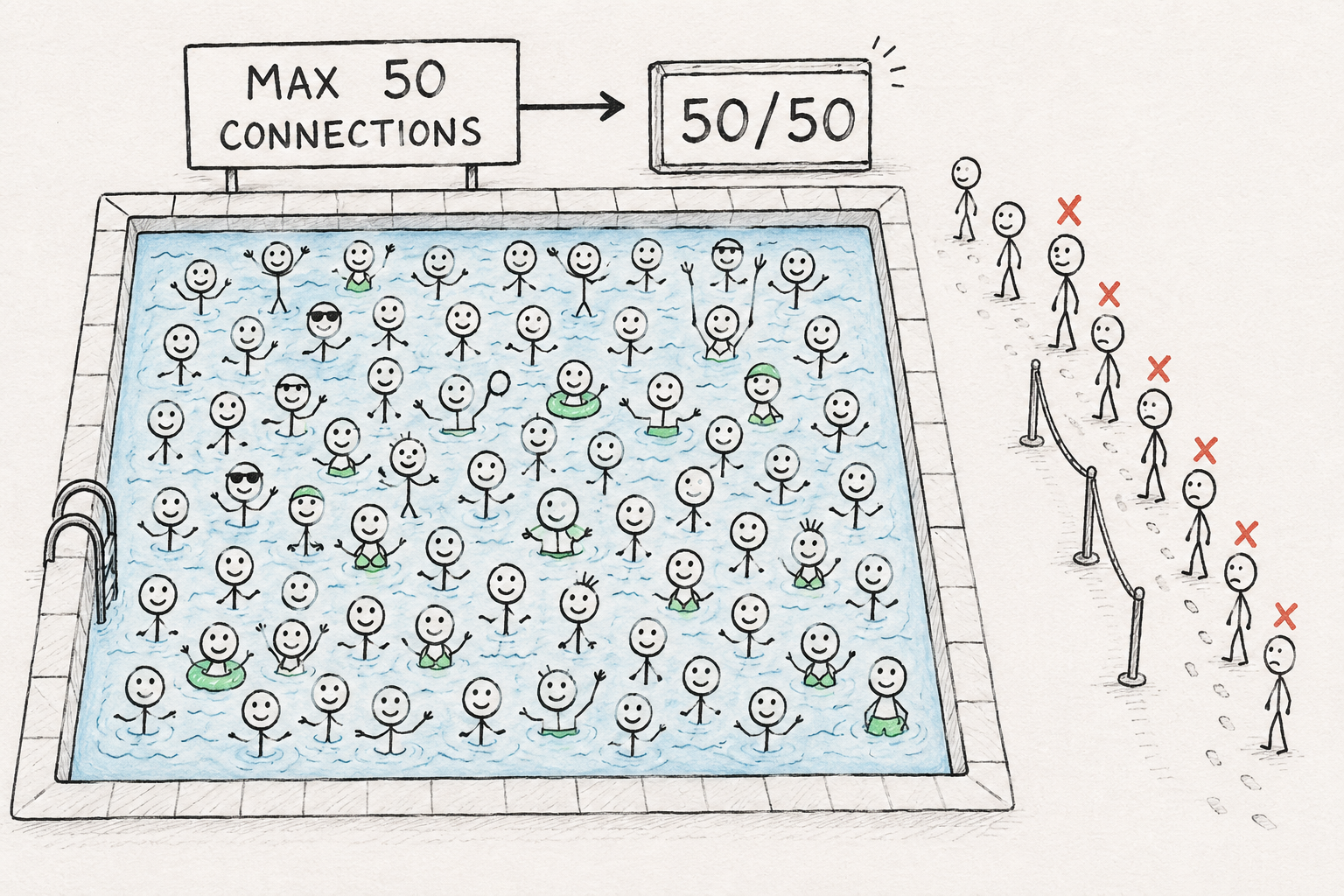
But here is the part nobody explains clearly: the pool has a maximum size. If you configure a pool with max_size=50, there are exactly 50 connections in the pool. Not 49. Not 51. Fifty. That is the hard limit.
When all 50 connections are checked out and a new request arrives that needs a connection, what happens? It waits. It joins a queue. It holds its place until a connection becomes available.
How long does it wait? Usually there is a timeout. If a connection does not become available within 5 seconds (or whatever your timeout is), the request fails.
This is not a bug. This is the system working as designed. The pool is telling you: you have more demand than capacity. Some requests will fail. Make a choice: add more connections, reduce demand, or accept that some requests will timeout.
Most developers choose none of these. They go back to pretending the pool is magic and wonder why their service keeps running out of connections.
A hand-drawn diagram of a pool of water with 50 swimming figures in it, all tightly packed. New figures are queueing up on the outside trying to get in. Some in the queue have X marks above their heads (they've timed out). Use sketch style with some figures looking stressed.
The Three Ways to Exhaust a Pool
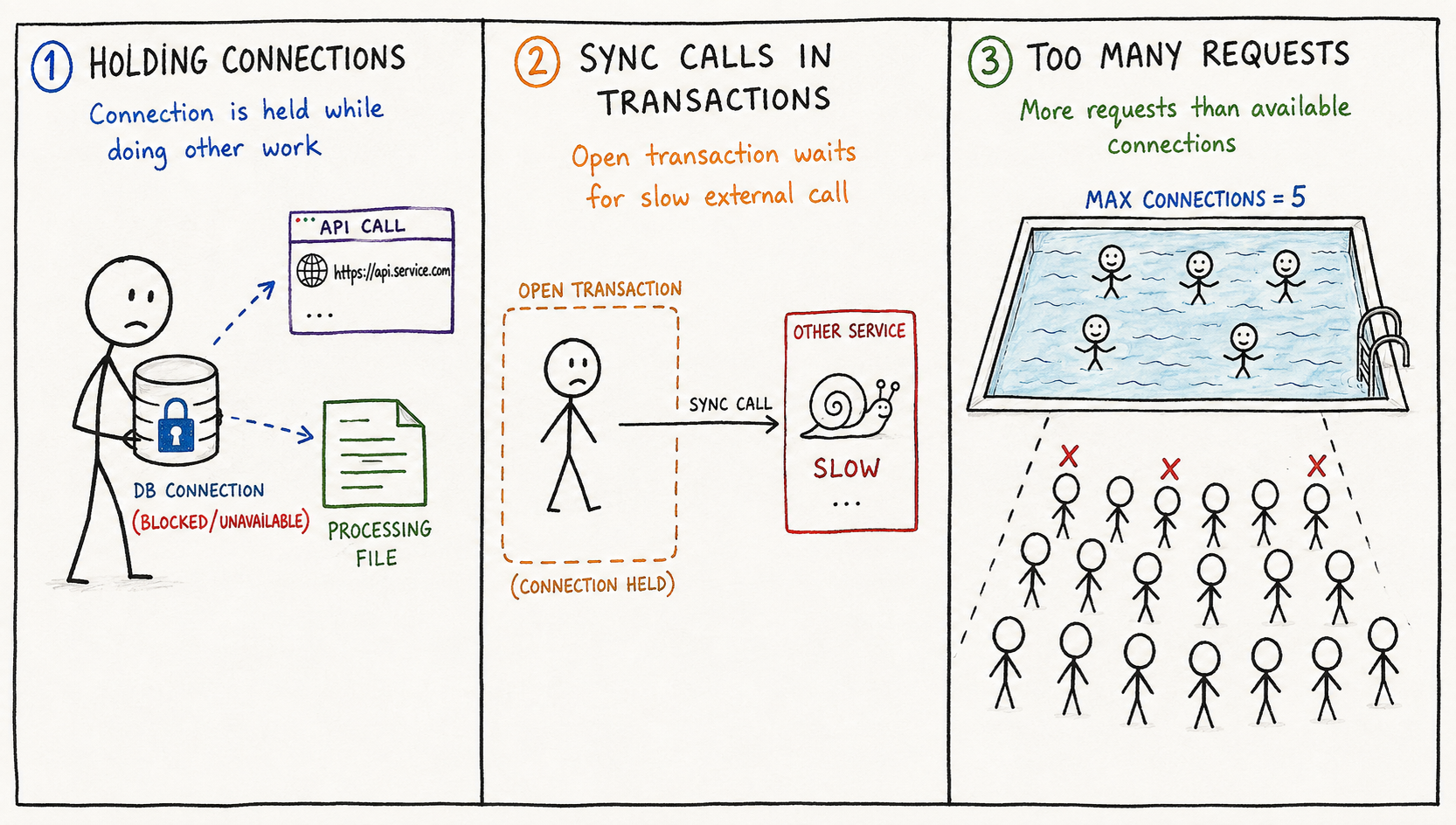
Connection pools do not spontaneously run out of capacity. You exhaust them. And there are three predictable patterns that do the exhausting.
Pattern 1: Holding Connections During Slow Operations
This is the most common. You get a connection from the pool. You start a transaction. You query the database (fast, 10ms). Then you do something slow. You call an external API. You process a large file. You wait for something.
While you are waiting, the connection is still checked out from the pool. It is not doing anything. It is just sitting there. In your transaction. Holding a lock. Preventing other requests from using it.
A request takes 500ms. The database query takes 10ms. The external API call takes 400ms. Your connection is checked out for 500ms even though it is only being used for 10ms.
Now imagine 100 requests like this happening simultaneously. Each one is holding a connection for 500ms. The pool has 50 connections. After 25 requests, all 50 connections are checked out. Request 26 arrives and cannot get a connection. It waits. After 3 seconds, it still cannot get one. It times out.
You have not hit the pool ceiling because of database load. You hit it because you are holding connections while doing other things.
Pattern 2: Synchronous Calls Inside Transactions
This is Pattern 1's evil twin. You start a database transaction. While the transaction is open, you make a synchronous call to another service (HTTP request, gRPC call, queue operation). You wait for that call to complete.
If that other service is slow or down, your transaction never completes. The connection stays checked out. If that happens to 50 requests simultaneously, the pool is exhausted. Every new request waits for a transaction that is stuck waiting for another service that might never respond.
I saw this destroy a service because a single microservice dependency had a 5-second timeout configured incorrectly (meant to be 500ms). Requests to that service were timing out slowly. Each timeout held a connection for 5 seconds. With a pool of 50, after 250 concurrent requests, all connections were exhausted. The service started returning errors even though the database was completely healthy.
The database was not the problem. The way the code used the database was the problem.
Pattern 3: Too Many Concurrent Requests for the Pool Size
This is the honest exhaustion. You have a pool of 50. A viral moment happens. 200 requests per second arrive. Each request needs a connection. After 50 requests, the pool is exhausted. The other 150 are waiting.
This is the only exhaustion scenario where the pool size is genuinely too small for your workload. The fix is straightforward: increase the pool size. Or decrease load. Or both.
But most exhaustions are not this pattern. Most exhaustions are Pattern 1 or 2, which means you have a perfectly adequate pool that is being used incorrectly.
A hand-drawn three-panel diagram. Panel 1: stick figure holding a database connection icon while doing other things (making API calls, processing files) - connection is blocked. Panel 2: stick figure with an open transaction while waiting for another service - connection stuck. Panel 3: many stick figures arriving at once, more people than available connections. Use different colors or symbols for each pattern.
What Happens When the Pool Is Empty
A request arrives. The pool has no available connections. What happens next is important because it is where most developers misunderstand the failure mode.
The request does not immediately fail. The request waits. It joins a queue. It is a well-behaved request. It knows that eventually a connection will become available.
Except it might not. Or it might take too long.
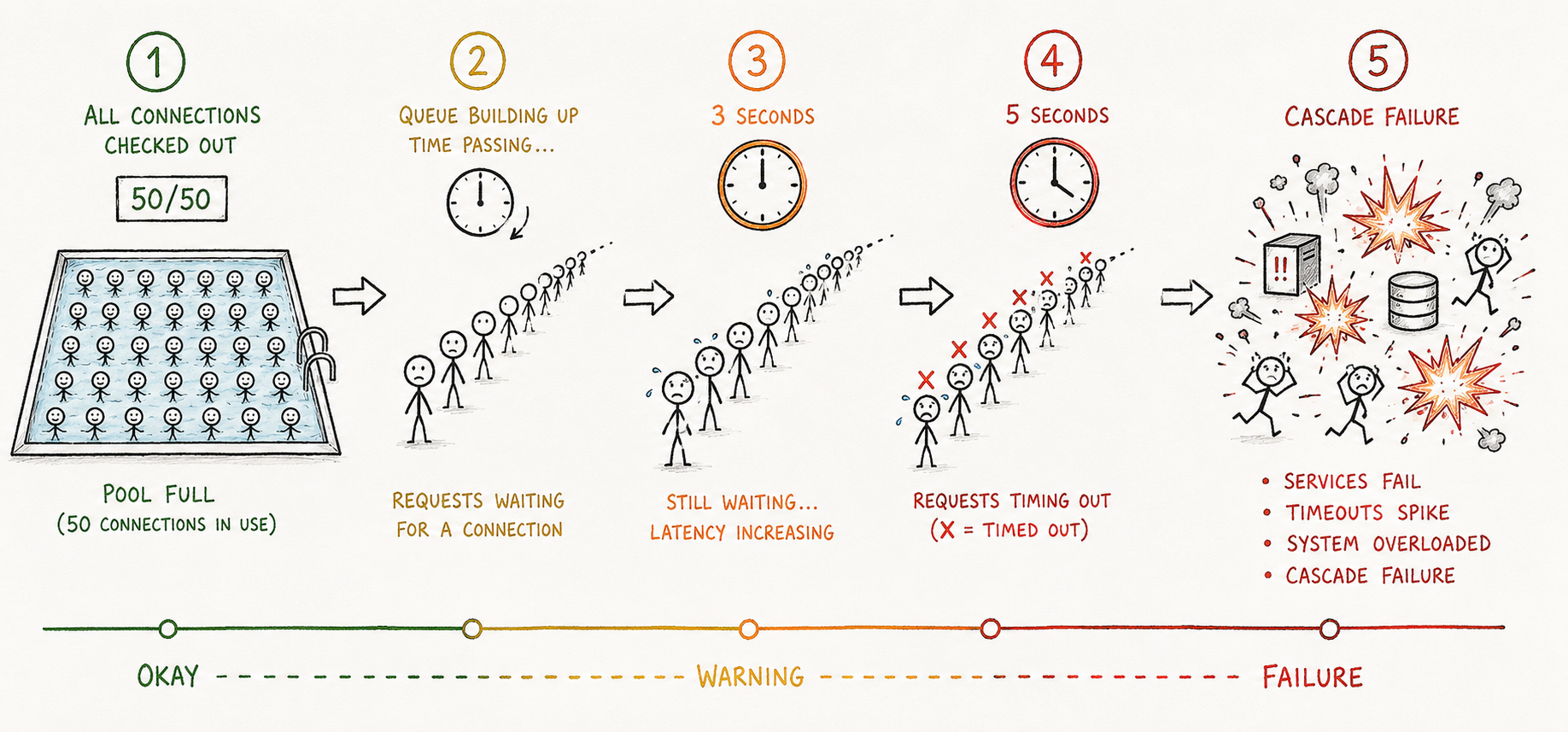
A request waits 1 second. No connection available. It waits 3 seconds. Still nothing. At 5 seconds, your application's connection pool timeout fires. The request fails with a timeout error. The application returns a 503 Service Unavailable response.
From the user's perspective, the service is down. From the server's perspective, the database is perfectly fine. The problem is invisible.
Here is the cruel part: this can continue for hours. The service keeps returning 503 errors. The monitoring alerts might not even trigger because the database metrics look fine. CPU looks fine. Memory looks fine. Everything looks fine. But the service is dead because it is waiting for connections that never become available.
This is the scenario I watched at 2:47 AM. Fifty connections checked out. Fifty requests waiting. All fifty timeout simultaneously. A hundred new requests arrive. They all timeout. The service is in a failure cascade.
When we restarted the service, we freed all the held connections. Traffic came back. For two minutes it was fine. Then the same leak started again because we never found what was holding connections open. We were just rebooting every few minutes until the on-call engineer figured out which request handler was doing something stupid inside a transaction.
It was making an HTTP call to an internal service. That service was overloaded and slow. The HTTP call was taking 30 seconds. The transaction stayed open the entire time. After 2 minutes of traffic, all connections were exhausted. The fix was 3 lines of code: move the HTTP call outside the transaction.
A hand-drawn timeline showing connections being checked out (boxes disappearing from a pool), then a queue of waiting requests building up behind the pool, then X marks appearing when requests timeout, then chaos symbols and explosion when the cascade happens. Use colors to show the progression from okay to bad.
The Pool Is a Visibility Blind Spot
The most dangerous thing about connection pools is that they hide problems until they explode suddenly.
You have a request handler that holds connections for 2 seconds when it should hold them for 50 milliseconds. If you have 100 concurrent requests, you might not hit the pool ceiling. Your response times are slow, but you might not notice because "slow" is subjective. You blame network latency. You blame the database. You add more database indexes.
But you did not fix the problem. You just delayed it. Add more traffic. The problem gets worse. A slow day comes. The problems collide. All the slowly-leaking connections finally add up. The pool is exhausted. The service collapses.
Visibility requires asking the right questions:
How long is a typical request holding a connection? (If it is longer than the database operation, you have a problem.)
What operations happen inside transactions? (If you are calling external services inside transactions, you have a problem.)
How many connections are checked out right now? (Monitoring this is essential. If the number is constantly climbing, you have a leak.)
What is the queue depth for waiting requests? (This is the invisible metric. When it is non-zero, your pool is exhausted.)
Most applications do not monitor these things. They monitor database query performance. They do not monitor connection pool utilization. They do not monitor requests waiting for connections. These metrics are invisible until they are catastrophic.
What Actually Prevents This
Connection pool problems are preventable. Not through magic. Through discipline.
1. Keep transactions small and fast. A transaction should contain only database operations. Not API calls. Not file processing. Not waiting on external services. If you need to call an external service, do it before the transaction or after it. Not during.
2. Profile connection lifetime in production. Use APM (Application Performance Monitoring) to see how long each request holds a connection. If the connection is held for longer than the database query duration, you have a leak. Find it.
3. Set connection timeouts low and understand what they mean. A 5-second pool timeout is not generous. It is a sign that something is wrong. If requests are waiting 5 seconds for a connection, your pool is exhausted. Your service is in a failure state. Make that failure visible. Alert on it immediately.
4. Monitor queue depth. How many requests are waiting for a connection right now? This should be zero almost all the time. If it is not zero, your pool is not sized correctly or your code is holding connections too long. Either way, you have a problem.
5. Make the pool size explicit. Do not use defaults. Calculate it. A common rule is: pool_size = (max_concurrent_requests / average_requests_per_connection). If you expect 200 concurrent requests and each request uses a connection for 100ms, and a new request arrives every 10ms on average, then you need more connections than you think. Work through the math.
6. Test with realistic load. Not 100 requests. Load test with 10x your expected peak. Watch the queue depth metric. Watch connection utilization. At what traffic level does your pool start getting exhausted? That is your real capacity ceiling. It is probably lower than you think.
The Database Is Fine, Your Code Isn't
Connection pool exhaustion is almost never a database problem. It is a code problem. The database is sitting there, ready to accept queries, serving them at full speed. The problem is that your code is not releasing connections fast enough.
This is why connection pool problems feel mysterious. Everything you monitor says the system is fine. It is not fine. It is just failing in a way you are not observing.
The developers who never get paged for connection exhaustion are the ones who understand that the pool is not magic. It is a finite resource. It has a ceiling. When you treat code that holds connections as a serious issue, you prevent exhaustion before it becomes a crisis.
When you treat the pool as magic and move on, you are just waiting for 2:47 AM on a Tuesday when it all fails at once.
Your database is not the bottleneck. Your connection pool is. And it will fail silently until you learn to watch it.